A scanner you have to remember to run is a scanner you will eventually forget to run. The value of container security compounds only when it is automatic—part of every pull request and every build, enforced by policy rather than by discipline. This article covers the features that make DockSec a CI/CD citizen: machine-readable output, severity gating with honest exit codes, SARIF for GitHub code scanning, and baseline "ratchet" mode for adopting gates on projects that already have findings.
Machine-readable output with --json
Human summaries are for humans. Pipelines need structured data. The --json flag prints a single JSON object to stdout—scan info, the full vulnerabilities list, severity counts, and any AI findings—and moves every human-readable message to stderr, so stdout carries nothing but the payload:
That clean separation is deliberate; you can pipe stdout straight into jq or another tool without scraping past a banner. By itself, --json writes no report files; pair it with --format if you want files as well as the stdout payload.
Exit codes that mean something
For a gate to work, the tool has to tell the shell whether the build should proceed. DockSec uses four CI-friendly exit codes:
-
0 — clean; no findings at or above your threshold
-
1 — findings at or above the --fail-on threshold
-
2 — usage or argument error
-
3 — tool or runtime error: a scan that failed, an image that was not found, a missing tool, or a failed AI pass
The distinction between 1 and 3 matters. A 1 means "the scan ran and found policy violations"—a real security signal. A 3 means "the scan did not run correctly"—an infrastructure problem. Conflating them is how broken pipelines quietly pass; keeping them separate lets you alert on them differently.
Gating a build with -- fail-on
The gate itself is one flag. Fail the build if any finding is HIGH or above:
If the scan finds anything at or above HIGH, DockSec prints how many findings tripped the gate and exits 1; your CI step fails and the deploy is blocked. --fail-on gates on the structured findings—image vulnerabilities and Compose misconfigurations. When the threshold you gate on is lower than the severity you scanned, DockSec widens the scan automatically so the gate can actually see those findings; you cannot accidentally gate on a severity you never collected.
SARIF for GitHub code scanning
Exit codes gate the build. SARIF surfaces the findings where developers already work—inline on pull requests and in the GitHub Security tab. The --sarif flag writes a SARIF 2.1.0 report:

Each unique vulnerability becomes a SARIF rule; each finding becomes a result. Severity maps to SARIF levels—critical and high to error, medium to warning, low and unknown to note. --sarif is independent of --format: it always writes its file regardless of which human-readable formats you selected, because it targets tooling rather than reading.
In a workflow, pair it with the standard upload action:
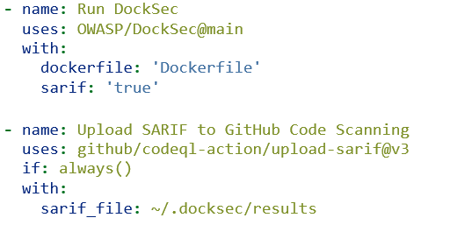
The if: always() is not optional. Without it, the upload step is skipped whenever --fail-on makes DockSec exit non-zero—which is precisely when you most want the findings visible. Run the gate and the upload as separate concerns.
The adoption problem: baselines
Here is the reality of turning on a gate for an existing project: the first run lights up with pre-existing findings, the build goes red, and everyone's first instinct is to rip the gate back out. A gate you cannot turn on is not a gate.
Baseline mode solves this. You snapshot today's findings once, commit the baseline, and from then on the gate fires only on findings that are new relative to that snapshot: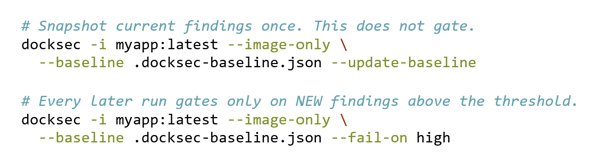
Findings are matched by vulnerability ID, target, and package name, so the baseline stays valid as unrelated findings come and go. This is “ratchet” mode: you accept the current state as a known-debt baseline, stop the bleeding by blocking anything new, and pay down the existing debt on your own schedule. When you triage and decide to accept a finding, re-run with --update-baseline to fold it into the new baseline. It is the single most important feature for getting a gate adopted rather than reverted.
For teams on GitHub, the Action wraps all of this. The minimal form:
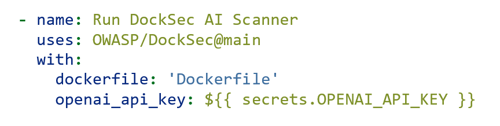
The Action exposes the CLI flags as inputs—severity, fail_on, format, output_dir, and sarif—so you can express your whole policy declaratively in the workflow. The scanners come pre-installed in the Action's container, so there is no separate setup step.
Putting it together, a pragmatic path to an enforced gate looks like this:
-
Observe. Add DockSec to CI in scan-only mode with no gate. Let it run on pull requests and write SARIF so findings show up in the Security tab. Nobody is blocked yet; you are building visibility and a sense of the baseline.
-
Baseline. Once the team has seen the findings, snapshot them with
--update-baseline and commit the baseline file. -
Gate on new. Add --fail-on high alongside the baseline. Now any new high-or-critical finding blocks the build, while existing debt does not. This is the step that changes behavior without triggering a revolt.
-
Ratchet down. Periodically triage the baseline, fix or formally accept findings, and re-baseline. Over time the accepted-debt set shrinks and your effective gate tightens.
Notice that this rollout is a sequence of small, reversible steps, each of which delivers value on its own. That is what makes it stick.
CI turns DockSec from a tool you run into a policy you enforce. But enforcement raises a strategic question: how do you know it is working? How do you measure whether posture is improving over time, and how do you talk about that to people who do not read severity tables? That will be the subject of the final article—scoring, metrics, and adopting DockSec as part of a security program rather than a single pipeline step.
This is the fourth in a five-part series. Watch for coming installments on Tuesdays.